Pixel 10 Tips and Tricks: Every Setting Worth Turning On
Unbox a Pixel 10, Pixel 10 Pro, or Pixel 10 Pro XL and you meet a fraction of what the phone can do. Across the whole lineup, the best features ship switched off by default, tucked a few menus deep, waiting for someone to find them.
Specs for all three models come first, then the settings and tricks worth switching on straight away, then the case for buying one refurbished: every one of those features runs the same, regardless of who owned the phone first.
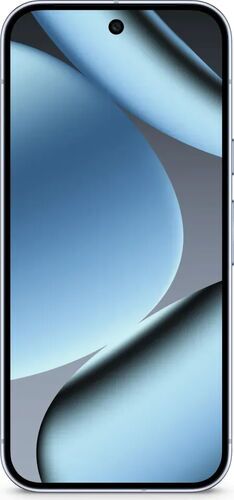
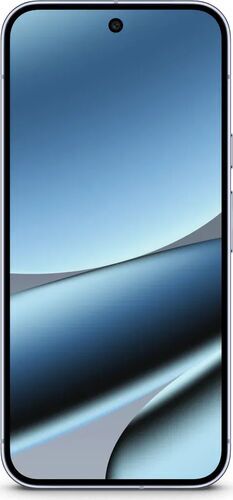
Pixel 10 vs Pixel 10 Pro vs Pixel 10 Pro XL: specs at a glance
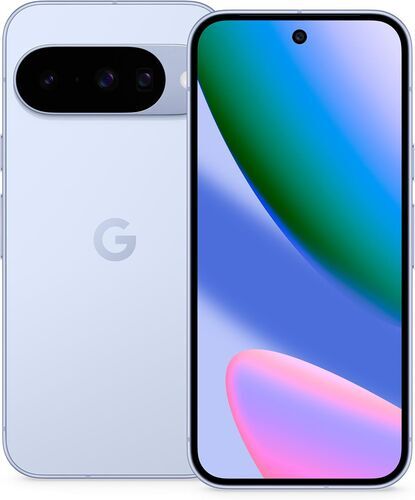
From 512,55 €
Chip
Google Tensor G5
Display
6.3" OLED, 120Hz
Battery
4970 mAh
RAM
12 GB
Rear camera
48MP main, 13MP wide, 10.8MP telephoto
Weight
204 g
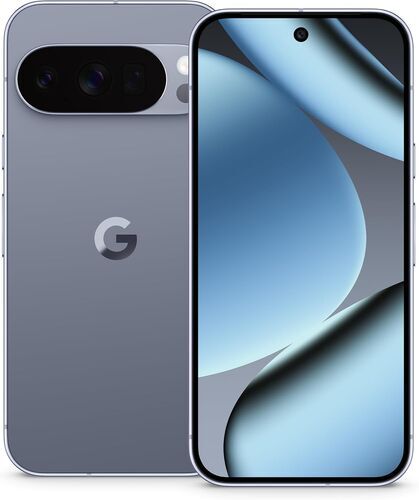
Google Tensor G5
6.3" OLED, 120Hz HDR+
4870 mAh
16 GB
50MP main, 48MP telephoto, 48MP ultra-wide
207 g
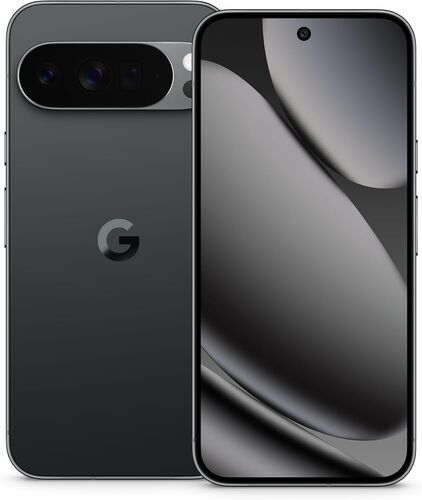
Google Tensor G5
6.8" OLED, 120Hz HDR+
5200 mAh
16 GB
50MP main, 48MP telephoto, 48MP ultra-wide
232 g
Shop refurbished Pixel 10, Pro, and Pro XL
Do these four things first
Four settings make the biggest difference in the first ten minutes with a Pixel 10, and all four are easy to skip during setup.
Run the update check. Settings > System > System update, before anything else.
Turn on Photos backup. It’s off by default, and it’s the one people forget until photos go missing between devices.
Switch on the full Theft Protection suite (Identity Check, Theft Detection Lock, Offline Device Lock) under Settings > Google > Theft Protection.
Set Charging Optimization under Settings > Battery > Charging Optimization: choose Adaptive Charging, or cap it at 80% for longer-term battery health.
Display and battery settings worth flipping on your Pixel 10
Six settings are worth changing the moment you pick up a Pixel 10:
- Always On Display: keeps the clock and lock screen wallpaper visible without a tap. Settings > Display > Lock screen > Always Show Time and Info.
- Max screen resolution: sharpens everything on screen, at the cost of some battery life. Settings > Display > Screen resolution.
- Smooth Display (120Hz): surprisingly off by default, and scrolling feels smoother the moment it’s on. Settings > Display > Smooth Display.
- Touch sensitivity: compensates for a screen protector or case sitting between your finger and the screen. Settings > Display > Touch sensitivity.
- Charging Optimization: Adaptive Charging times a full charge to when you usually unplug, or cap it at a straight 80% for anyone who charges overnight every night. Settings > Battery > Charging Optimization.
- The Developer Options animation trick: tap the build number seven times under Settings > About phone to unlock Developer Options, then set Window, Transition, and Animator animation scale to 0.5x. Every app open and swipe snaps shut faster, the closest thing to a free speed boost the phone has to offer.
Lock down your Pixel 10: security and privacy tricks
Phone theft is common enough that Google built an entire suite around it, and it’s worth the ten minutes to set up properly. Identity Check demands your fingerprint or face before anyone can change your PIN or password outside a trusted location. Theft Detection Lock uses onboard motion sensors to auto-lock the screen the moment the phone is snatched out of your hand while unlocked. Offline Device Lock locks the phone automatically if someone pulls the SIM or kills the signal to dodge tracking. Find all three under Settings > Google > Theft Protection.
Private Space, new to Android 16, gives you a separate, PIN-locked area in the app drawer for anything you’d rather keep out of casual view: Settings > Security > Private Space.
The Pixel 10 also includes a free built-in VPN, no subscription required. Turn it on under Settings > Network & internet > VPN, and pin it to Quick Settings for one-tap access.
Flip to Shhh mutes the phone the instant you turn it face down on a table, with a short vibration to confirm it worked.
Emergency Mode is worth setting up before you ever need it: five quick presses of the power button plus a three-second hold triggers it, automatically texting your emergency contacts your live location if you don’t configure anything else.
Adaptive Vibration quietly adjusts haptic strength to the moment: gentler in a pocket, stronger somewhere loud, a setting a lot of other phones still don’t have.
The Advanced Protection Program locks things down further: only trusted apps install, every download and attachment gets scanned, and the phone becomes considerably harder to compromise. Chrome’s Enhanced Protection adds real-time warnings for malicious sites on top of that.
Extend Unlock keeps the phone unlocked for up to four hours while it’s on your body, or permanently at trusted places and around trusted Bluetooth devices like a watch or car.
Find Hub can locate the phone even offline, using nearby devices on the network to widen the search radius, worth turning on before it’s needed, not after.
Camera and photo AI tools that help
Camera Coach works like a photography mentor standing just behind your shoulder. Point the camera at a scene and it scans for the strongest subject, a desk plant, a friend’s face, a skyline, then walks you through framing, angle, and zoom step by step until the shot lines up.
Now Playing listens quietly in the background and names the song playing nearby without you lifting a finger, then fetches the album art through Google Search once you turn on Enhance Now Playing under Settings > Sound & vibration > Now Playing. It keeps a running history, so a song stuck in your head at a cafe is one settings menu away from an answer.
Magic Cue pulls relevant details from Gmail, Calendar, and Messages to suggest what you need before you ask for it, like surfacing a flight number the moment a friend texts about your trip. It processes on-device and stays off until you opt in.
Circle to Search turns the whole screen into a search box: press-hold the home bar, then circle or tap anything on screen, a product, a landmark, a face you can’t place, to search it without leaving the app you’re in.
Ask Photos edits or searches the photo library with plain text instead of menus, though it needs “group similar faces” turned on first and a few days to fully activate. Auto Best Take swaps in the best-smiling face from a burst automatically, and Top Shot captures the frames just before and after the shutter press, so a blink or a bad angle rarely gets the final say.
Add Me uses AR positioning to fit the photographer into their own group shot: frame the group first, hand the phone to someone else, and the app guides them to line everyone up in the gap left behind. Pixel Studio, the built-in AI image generator, creates original art from a text prompt and can turn any of it into a sticker.
Gemini shortcuts and hidden Pixel 10 power-user tricks
Gemini opens three different ways on the Pixel 10: say it out loud, hold down the home bar, or hold the power button for a second. Pick whichever fits the moment, since all three land in the same place.
The single most overlooked app on the phone might be Notebook LM. Feed it a PDF, a website, a YouTube video, or pasted text, and it builds a chat about that material plus an AI-narrated audio conversation between two hosts discussing it, like a personal podcast episode about whatever you just handed it.
Quick Tap turns a double-tap on the phone’s back into a shortcut: screenshot, flashlight, or launch any app. Turn it on under Settings > System > Gestures > Quick Tap, and enable the sturdier-tap threshold if it’s triggering by accident in your pocket.
Hold For Me listens to hold music on your behalf and rings you back the moment a real person picks up, so you can put the phone down and get on with something else while you wait.
Multitasking and productivity tricks on your Pixel 10
Split-screen multitasking works from Recent Apps: drag one app to one side of the screen, then tap a second app to fill the other half. It works in landscape too, and double-tapping the divider in the middle swaps the two apps’ positions instantly. Drag the divider fully to one side to exit, and a video you were watching keeps playing in a small floating window instead of stopping.
Drag-and-drop replaces copy-paste for a lot of everyday moves: press and hold a piece of text or an image, then drag it straight into another open app through the multitasking menu, no copy, no switch, no paste required.
Quick Settings has more tiles than most people ever add. Swipe down with two fingers (or double-swipe with one) to open it, then drag in tiles for hotspot, nightlight, calculator, digital car keys, or the voice recorder, and drag to reorder the whole panel.
Pause app mutes notifications from one specific app for the rest of the day, useful for the one group chat that won’t stop buzzing during a meeting.
Rules quietly automates the phone around a location or Wi-Fi network: set one to switch on Do Not Disturb the moment you connect to the office Wi-Fi, or turn the ringer back up the moment you get home.
Calls, notifications, and hidden Pixel 10 gems
Direct My Call transcribes automated phone menus onto the screen in real time, so “press 1 for sales, press 2 for support” becomes something you tap instead of sit through. Call Screen goes further on incoming calls: it shows a live transcript of what the caller is saying, with quick-reply buttons, while Filter Spam Calls quietly rejects the numbers Google already suspects are junk.
Flash Alerts blinks the screen or the camera flash twice whenever a notification lands while the phone is on silent or vibrate, with a configurable flash color, a useful catch for anyone who misses calls with the phone in another room.
Notification Cooldown turns down the volume on a burst of back-to-back notifications for up to a minute, without touching calls, alarms, or priority conversations. Pair it with a Pixel tablet and dismissing a notification on one device clears it from the other automatically.
A few gems most people never find: the built-in Thermometer app uses the phone’s rear sensors to read an object or body temperature, handy for checking whether anyone in the house is running a fever. Live Caption auto-captions any audio playing on the phone, no internet connection required once the language pack downloads. Google Lens can copy text straight out of a screenshot and paste it onto a nearby Mac or Windows computer through Chrome, no cable, no email to yourself. And Voice Recorder’s Create Music feature generates a short AI backing track behind a voice memo, on request.
Make it yours: Pixel 10 customization tips
Themed icons recolor every app icon to match your wallpaper’s dominant tone, turning a cluttered home screen into one coherent palette in a single tap: Settings > Wallpaper & style > Themed icons.
Weather-reactive wallpapers are the customization option most worth trying first. Set one and the home screen starts drizzling when it’s raining outside, fogs over on a grey morning, or dusts itself with snow the moment your local forecast turns wintry, redrawn in real time to match the sky outside your window.
Cinematic wallpaper turns a single photo into a 3D-depth scene with a subtle parallax effect as you tilt the phone, built from any photo in your library.
The lock screen goes deep too: pick a clock style, color, and size, add custom text above the time, and swap the two default shortcuts (camera and flashlight) for anything you reach for more often, like Google Wallet or the voice recorder.
Calling card customization turns an incoming call from one contact into its own designed screen: a chosen photo, font, and background color, distinct from the stock caller ID.
Quick Share now moves files to and from iPhones, iPads, and Macs the same way AirDrop moves them between Apple devices, once updated through Settings search.
Screen Saver rotates through a chosen photo album while the phone charges upright or wirelessly, turning a nightstand charging spot into a rotating photo frame.
Why buy your Pixel 10 refurbished?
Gemini, Camera Coach, Theft Protection, the themed icons, the weather-reactive wallpapers: all of it is software. It ships identically on every Pixel 10 unit that leaves the factory, whether it sells new on day one or shows up on refurbed a year later. The phone’s personality comes from the settings menu, not the unboxing moment, and a refurbished unit gets every one of them.
What changes is the price and the footprint. A refurbished Pixel 10 from refurbed has been professionally tested, cleaned, and reset, then graded on appearance only (Good, Very Good, Excellent, or Premium; every unit is fully functional regardless of grade), backed by a minimum 12-month warranty, at a noticeably more affordable price than buying new. The promised 7 years of Android updates apply the same way no matter who bought the phone first.
Against a private second-hand listing instead of a store, the gap is testing and warranty: a refurbished phone has already been checked and comes with a return window, where a private sale typically has neither.
The environmental case for a refurbished Pixel 10
Choosing refurbished over new makes a measurable difference. Based on research by Fraunhofer Austria, verified under ISO 14040/14044 standards, buying a refurbished Pixel 10 instead of a new one avoids:
↓ 83.4 kg CO₂ SAVED, 86% fewer emissions (equivalent to approx. 584 km driven)
↓ 31,043 litres of water SAVED, 89% less virtual water (equivalent to approx. 207 bathtubs)
↓ 178.7 g of e-waste SAVED, 80% less electronic waste
↓ 44.5 g of critical raw materials SAVED, 67% reduction
↓ 1.4 g of conflict materials SAVED, 96% reduction
Step up to the Pixel 10 Pro (84.8 kg CO₂ SAVED ↓, 89% water SAVED ↓, 181.8 g e-waste SAVED ↓) and the picture holds nearly identical, both phones share the Tensor G5 platform and a similar bill of materials. Full methodology and refurbed’s wider environmental reporting live on the sustainability page.
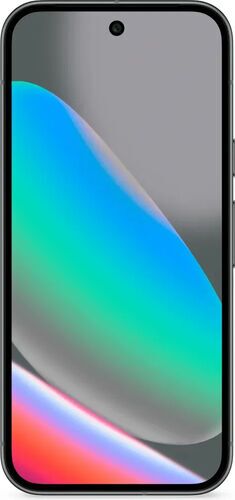
Pixel 10 tips and FAQs
Does a refurbished Pixel 10 still get the full 7 years of Android updates?
Yes. Software updates and features like Gemini, Magic Cue, and Camera Coach are tied to the device itself, not the original owner, so a refurbished unit gets the same update timeline as one bought new.
Is a refurbished Pixel 10 as secure as a new one?
Yes. Theft Protection, Private Space, and the Advanced Protection Program are software features baked into Android 16 itself. None of them depend on the phone’s sales history or how many owners it’s had.
How much can you save buying refurbished instead of new?
It varies by model, storage, and condition grade, but refurbished pricing on a recent flagship like the Pixel 10 typically runs well below the new retail price. Check current listings on refurbed for the exact gap on any given day.
Does the Pro camera system work the same on a refurbished Pixel 10 Pro?
Yes. Camera Coach, the telephoto zoom range, and every computational photography feature are software running on the same sensor hardware, shipped identically whether the phone is refurbished or brand new.
Ready to get more phone for less?
Gemini, Camera Coach, Theft Protection, the customization tricks: all of it runs the same on a refurbed Pixel 10 as it does on a new one, for a noticeably more affordable price and a lighter footprint.

Sign up for our newsletter for the first time and save €15!
Never miss an offer again.
Information about the use of personal data can be found in our Privacy policy.
Get the refurbed app
For iOS and Android



Confirm sign-up
Almost done: We’ve sent you a confirmation email
- © Refurbed Marketplace GmbH
- Accessibility
- T&C
- Privacy Policy
- Imprint
- Legal Notices
- European Data Act
- Cookie Policy